Was this helpful?
Join our Discord community to ask questions, give feedback, or suggest improvements.
Join Discord[ RELATED ]
Join our Discord community to ask questions, give feedback, or suggest improvements.
Join DiscordThe 2D viewer includes a comprehensive set of keyboard shortcuts and controls to help you navigate demos efficiently.
Master these controls to quickly analyze rounds, seek to specific moments, and use drawing tools without taking your hands off the keyboard.
These are the essential controls for navigating through demos:
Control playback speed on the fly with these shortcuts:
These controls work while held down. Release the key to return to normal playback speed.
Quick access to drawing tools without opening the menu:
Additional useful shortcuts:
All keyboard shortcuts can be customized to your preference through the settings menu.
Access the shortcuts configuration by clicking the Settings button in the toolbox, then navigate to the Shortcuts tab. Here you can rebind any control to a different key.
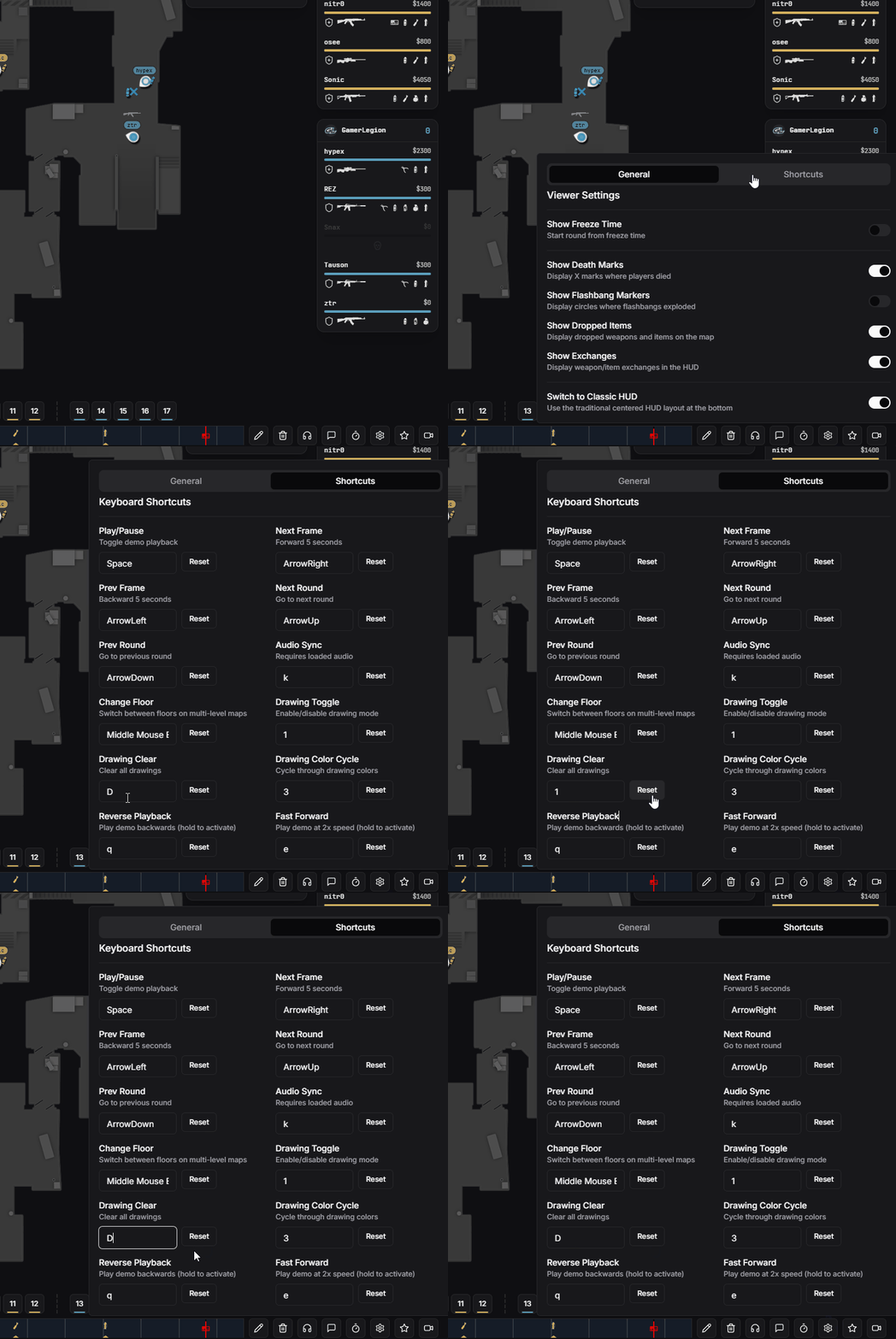
Keyboard shortcuts configuration menu